Laptop Buying Checklist for Students: What to Prioritize
Buying a laptop as a student can feel overwhelming with so many options available in the market. Whether you are pursuing engineering, arts, business, or any other field, choosing the best laptop for student use requires careful consideration of features that match your academic and personal needs. From performance to portability, storage to battery life,…
Buying a laptop as a student can feel overwhelming with so many options available in the market. Whether you are pursuing engineering, arts, business, or any other field, choosing the best laptop for student use requires careful consideration of features that match your academic and personal needs. From performance to portability, storage to battery life, making the right choice can save both time and money. This checklist will guide students to focus on the most important factors while exploring options from popular brands.
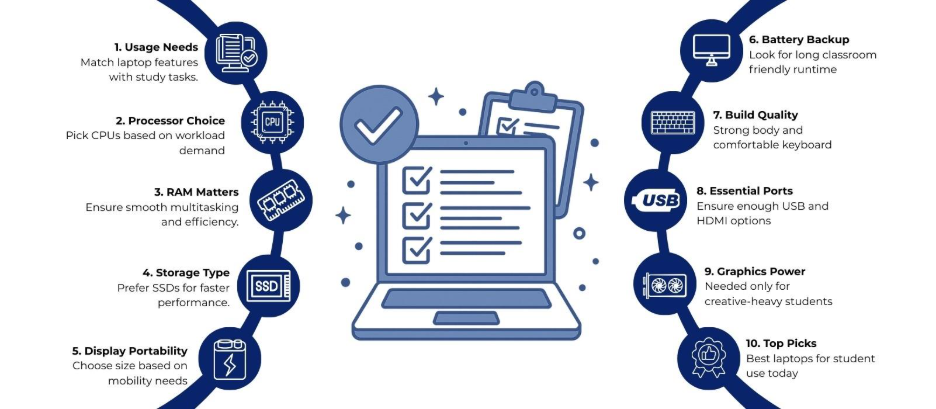
1. Define Your Usage Needs
The first step in selecting the best laptop for student life is understanding how you intend to use it. Are you mostly typing assignments, browsing the internet, and attending online lectures? Or do you need to run heavy software for coding, graphic design, video editing, or 3D modeling?
- Light Usage: For web browsing, word processing, and media consumption, laptops with mid-range processors like Intel Core i3 or AMD Ryzen 3 and 4GB–8GB RAM are sufficient. Examples include the HP Pavilion x360 and Lenovo IdeaPad 3.
- Moderate Usage: For tasks like programming, multitasking, and moderate multimedia editing, a machine with Intel Core i5 or AMD Ryzen 5 and at least 8GB RAM is recommended. Laptops like the Dell Inspiron 14 or ASUS VivoBook 15 fit this category.
- Heavy Usage: For gaming, video editing, or CAD software, high-performance processors like Intel Core i7/i9 or AMD Ryzen 7/9 with 16GB or more RAM, and discrete graphics like NVIDIA GeForce are suitable. Examples include the ASUS ROG Zephyrus or the Apple MacBook Pro 16-inch.
2. Processor Matters
The processor is the brain of your laptop and directly affects speed and multitasking capabilities. Students focusing on coding, software development, or creative work need a processor that handles multiple applications smoothly.
- Intel Core Series: Core i5 or i7 is ideal for most students; i3 is suitable for basic tasks.
- AMD Ryzen Series: Ryzen 5 and Ryzen 7 processors offer strong multitasking and gaming performance at competitive prices.
For students who rely on web-based applications and lightweight software, a mid-range processor may suffice. However, those in STEM fields or creative disciplines may need high-end CPUs for smoother performance.
3. RAM and Multitasking
RAM affects how well your laptop can handle multiple applications simultaneously.
- 8GB RAM: Suitable for everyday student tasks like browsing, note-taking, and streaming.
- 16GB RAM or More: Recommended for video editing, gaming, or running virtual machines.
Laptop brands like Lenovo ThinkPad E14 and Dell XPS 13 come with configurable RAM options, so students can upgrade later if needed.
4. Storage Type and Capacity
Storage determines how many files, software, and media you can keep on your laptop and how quickly it operates.
- SSD (Solid State Drive): Offers faster boot times, quicker file transfers, and better overall performance. A 256GB SSD is the minimum for students, while 512GB–1TB is ideal for those with large files.
- HDD (Hard Disk Drive): Cheaper but slower; suitable only if the budget is tight and storage capacity is the priority.
For a balance of speed and capacity, some laptops combine SSD and HDD. The HP Envy series offers this option.
5. Display and Portability
Students often carry their laptops to classes, libraries, and cafes. Lightweight designs and compact screens improve portability.
- Screen Size: 13–14 inches are lightweight and portable; 15–16 inches offer more workspace but add weight.
- Resolution: Full HD (1920×1080) is standard and provides sharp text and visuals. For creative students, models like the Apple MacBook Air or the Dell XPS 15 can be a good choice.
- Touchscreen: Optional, mostly useful for hybrid laptops or tablets like the HP Spectre x360.
6. Battery Life
Long battery life is important for students attending classes or working on assignments without easy access to power outlets.
- 8–10 Hours: Suitable for light to moderate use.
- 10+ Hours: Recommended for heavy use or students who frequently travel.
Brands like Apple MacBook Air M2, Dell XPS 13, and Lenovo Yoga Slim are known for their impressive battery performance.
7. Keyboard and Build Quality
Comfortable typing is crucial for students who write essays, code, or take notes extensively.
- Keyboard Layout: Look for well-spaced keys with good travel. Backlit keyboards are useful for late-night work.
- Build Quality: Aluminum or magnesium alloy bodies are durable, while plastic bodies reduce weight but may feel less premium.
Laptops like the Lenovo ThinkPad and Apple MacBook are widely praised for their keyboard and build quality.
8. Connectivity and Ports
Students often need to connect external drives, projectors, or other peripherals.
- USB Ports: Multiple USB-A and USB-C ports provide flexibility.
- HDMI/DisplayPort: Useful for presentations or connecting to external monitors.
- Wi-Fi and Bluetooth: Look for Wi-Fi 6 for faster internet speed and reliable connections.
The Dell Inspiron and ASUS ZenBook series offer multiple ports, making them versatile for academic use.
10. Graphics and Creative Work
For students in engineering, architecture, video production, or gaming, the graphics processor is important.
- Integrated Graphics: Suitable for general tasks and light multimedia.
- Dedicated GPU: Recommended for graphics-heavy applications. NVIDIA GeForce MX450 or GTX/RTX series in laptops like ASUS ROG or Dell G15 enhances performance for 3D modeling and video editing.
Top Laptop Recommendations for Students
Here’s a curated list of laptops from trusted brands suitable for students:
- ASUS VivoBook 15 – Balanced performance with Ryzen 5, 8GB RAM, and 512GB SSD.
- Dell Inspiron 14 – Reliable, mid-range laptop with an i5 processor and good battery life.
- Lenovo IdeaPad 3 – Affordable, lightweight, and suitable for everyday tasks.
- HP Pavilion x360 – Convertible design with touchscreen and solid performance.
- Apple MacBook Air M2 – Premium ultralight laptop with exceptional battery and macOS ecosystem.
These options cater to different budgets and use cases, helping students find the best fit for their academic needs.
Final Thoughts
Selecting the best laptop for student use requires a balance between performance, portability, battery life, and budget. By carefully evaluating your requirements, students can choose a laptop that supports both academic tasks and creative pursuits for years to come.
Find your ideal laptop today at Laptop World and make your student life smoother and more productive!
FAQs
1. What is the best laptop for student use?
The best laptop depends on your field and tasks. For light tasks, mid-range laptops like Lenovo IdeaPad 3 or HP Pavilion x360 work well. For heavy workloads, MacBook Air M2 or ASUS ROG Zephyrus are better options.
2. How much RAM do students need in a laptop?
For general tasks like browsing and writing assignments, 8GB RAM is sufficient. For coding, video editing, or multitasking, 16GB RAM or more is recommended.
3. Should I choose an SSD or HDD for my student laptop?
SSDs are faster and make the laptop more responsive. A 256GB SSD is enough for most students, while 512GB–1TB suits those with large files.
4. Which laptop brands are good for students?
Popular choices include ASUS, Lenovo, HP, Dell, and Apple, offering options across budgets and performance needs.
5. What screen size is suitable for students?
13–14 inches offer portability, while 15–16 inches provide more workspace. Creative students may prefer high-resolution displays for design and editing tasks. z