How to Remove Ants from Your Laptop Keyboard
Learn practical steps to remove ants from your laptop keyboard, prevent infestations, and keep your device clean with easy DIY methods and expert tips.
Finding ants crawling on your laptop keyboard can be alarming. Ant infestations not only damage your laptop but can also affect your typing experience and hygiene. Ants are attracted to food crumbs, sugary drinks, and warm environments, making laptops a surprising hotspot. This guide will walk you through effective methods to remove ants from your laptop keyboard and prevent them from returning.
Why Ants Invade Your Laptop Keyboard
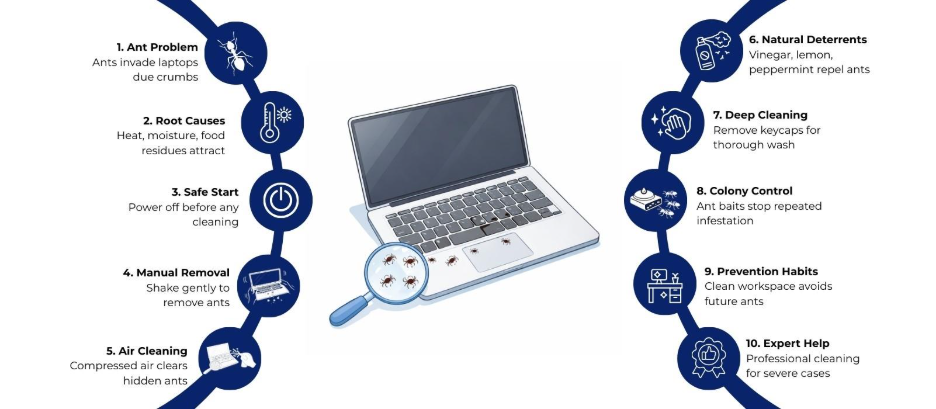
Ants are drawn to warmth, moisture, and food particles. Common reasons they invade laptops include:
- Food Residue: Crumbs or sticky residues from snacks and beverages.
- Warmth: Laptops generate heat, which attracts ants seeking warmth.
- Moisture: Spilled water, coffee, or soft drinks on or near the keyboard.
- Accessibility: Small gaps between keys act as easy entry points.
Understanding why ants target your device can help you take preventive steps after removal.
Step-by-Step Methods to Remove Ants from Laptop Keyboard
Here’s a detailed approach to safely remove ants without harming your laptop:
1. Power Down and Unplug
Before starting any cleaning process:
- Shut down the laptop completely.
- Unplug the charger and any connected peripherals.
- Remove external devices such as USB drives, mice, or keyboards.
This prevents electrical damage during cleaning and keeps you safe.
2. Shake Out Loose Ants
Gently tilt and shake your laptop to dislodge ants trapped between keys:
- Hold the laptop upside down and lightly tap on the back.
- Avoid excessive force to prevent internal damage.
- Use short, gentle shakes to avoid loosening components.
This method removes ants without using chemicals.
3. Use Compressed Air
Compressed air is highly effective in dislodging ants and debris:
- Hold the laptop at a slight angle.
- Spray air between the keys to remove ants hiding in crevices.
- Repeat from multiple angles for thorough cleaning.
Compressed air also clears dust and crumbs, reducing the chance of future infestations.
4. Apply Natural Deterrents
Chemical sprays may damage your laptop, so opt for safe alternatives:
- Vinegar Solution: Dip a cotton swab lightly in white vinegar and clean the edges of keys.
- Lemon Juice: Acts as a deterrent when applied carefully around the keyboard perimeter.
- Cinnamon or Peppermint: Place small amounts near your workspace; ants avoid these scents.
Avoid pouring liquids directly onto the keyboard to prevent damage.
5. Clean Removable Keycaps (If Possible)
You can safely pop the keycaps off of some laptop keyboards:
- Use a small keycap puller or gently pry with a plastic tool.
- Wash keycaps in warm, soapy water and dry completely before reattaching.
- Clean underneath with a soft brush or compressed air.
This method enables deep cleaning of hidden areas where ants may nest.
6. Use Ant Baits Strategically
If ants keep returning, ant baits can target the colony:
- Place ant baits near the laptop, not directly on it.
- Avoid spraying chemical insecticides on your device.
- Baits attract ants to feed and carry poison back to the colony, addressing the root cause.
This step controls the infestation in your environment rather than just the laptop.
7. Maintain a Clean Workspace
Prevention is the key to avoiding recurring ant invasions:
- Avoid eating or drinking near your laptop.
- Wipe down surfaces and keyboards regularly.
- Store food and sugary drinks away from work areas.
- Vacuum surrounding areas to reduce ant trails.
A clean workspace minimizes attractions for ants and improves device hygiene.
8. Consider Professional Cleaning
If ants persist despite your efforts:
- Take your laptop to a certified technician for internal cleaning.
- Professionals can safely open the device, remove infestations, and check for damage.
- This option prevents accidental harm to delicate components.
Professional intervention is especially useful for high-end laptops or severe infestations.
You can get in touch with Laptop World in Malleshwaram for assistance.
Quick Tips to Keep Ants Away from Your Laptop
- Use Keyboard Covers: Silicone covers block entry points and are easy to clean.
- Elevate Your Laptop: Use a stand to minimize contact with contaminated surfaces.
- Monitor for Trails: Ant trails can indicate nearby nests; clean surfaces thoroughly.
- Store Snacks Properly: Keep all food sealed and away from electronics.
- Regular Cleaning: Weekly dusting and compressed air use prevent buildup.
Signs Your Laptop May Be Infested by Ants
- Unexplained movement of small insects across keys.
- Sticky or unusual residue between keys.
- Unusual keyboard response or key sticking.
- Ant trails near your laptop.
- Occasional overheating caused by ants nesting in vents.
Early detection allows prompt removal before significant damage occurs.
Final Thoughts
Ants in your laptop keyboard can be frustrating and potentially harmful if ignored. By following careful removal techniques, using natural deterrents, and maintaining a clean workspace, you can eliminate infestations effectively. Remember to act promptly and avoid chemicals that could damage your laptop. Regular maintenance and preventive habits help keep your device ant-free and operating smoothly.
About Laptop World
With 20 years of experience in Retail, Laptop World is Bangalore’s oldest multi-brand laptop store, offering a personalized customer experience. We are unbiased towards any particular brand, dealing with top names like HP, Lenovo, Dell, Asus, and Apple. Our commitment to excellent customer service sets us apart.
For businesses, our corporate division, Nurture IT, provides comprehensive IT solutions tailored for startups in Indiranagar, ensuring all your IT needs are met in one place. From laptops to networking, servers, Information Security, End User Protection – we have you covered.
FAQs
- Can ants damage my laptop permanently?
Yes, if they nest inside, ants can cause electrical shorts, block cooling vents, and create sticky residue that affects key performance.
- Is it safe to use liquid cleaners on keyboards?
Direct liquid application is unsafe. Lightly dampened cotton swabs or cloths on key edges are safer for cleaning.
- How do I prevent ants from returning?
Maintain a clean workspace, avoid eating near your laptop, and consider using keyboard covers and natural deterrents like vinegar or peppermint.
- Will compressed air harm my laptop?
No, when used correctly. Hold cans upright, spray in short bursts, and avoid excessive force to prevent key or circuit damage.