Where to Get a Legit Battery Replacement for HP Pavilion 14? DIY or Not?
If you’re using an HP Pavilion 14, you’ll likely need to swap out the battery at some point. When performance starts to decline – like rapid draining, unexpected shutdowns, or inability to hold charge – it may be time for a replacement. But where should you get a legit battery replacement for your HP Pavilion 14, and is it wise to do…
If you’re using an HP Pavilion 14, you’ll likely need to swap out the battery at some point. When performance starts to decline – like rapid draining, unexpected shutdowns, or inability to hold charge – it may be time for a replacement. But where should you get a legit battery replacement for your HP Pavilion 14, and is it wise to do it yourself? In this comprehensive guide, we’ll walk you through your options, highlight the pros and cons, and help you make a confident decision.
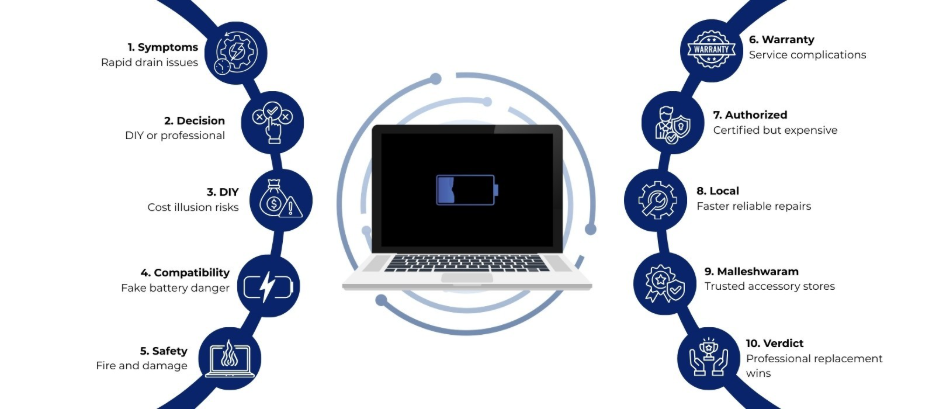
DIY Battery Replacement – Is It Worth It?
One of the first thoughts many tech users have is: Can I replace the battery myself?
The Appeal of DIY
DIY battery replacement might look appealing because:
- Potentially lower cost
- Quick turnaround
- Control over components
There are plenty of online guides and video tutorials showing how to open a laptop and swap batteries. However, these materials often lack context about compatibility, safety, and long-term reliability.
Major Concerns with DIY Battery Replacement
Compatibility Issues
Not all batteries labeled for HP Pavilion 14 are genuine or fully compatible. Using a mismatched battery can cause poor performance, reduced life, or even hardware damage.
Safety Risks
Laptop batteries are sensitive components. Mishandling can lead to short-circuits, overheating, or swelling. In worst-case scenarios, puncturing a lithium-ion battery can pose a fire risk.
Tools and Technical Skill
Opening modern laptops often requires specialized screwdrivers and experience. One wrong move can damage internal cables, connectors, or other parts.
Voiding Warranty or Service Guarantees
Even if your warranty has expired, unauthorized repairs can create complications in future service support.
When DIY Might Make Sense
DIY battery replacement could be reasonable if:
- You have prior experience with laptop repairs.
- You have the correct tools.
- You source a verified replacement battery.
- You are confident about your technical ability.
For most regular users, DIY is not recommended because of the risks and uncertainty involved.
Best Places to Get a Legit Battery Replacement
When it comes to replacing an HP Pavilion 14 battery, the priority should be a safe, compatible, and reliable replacement. There are a few dependable options:
1. Authorized Service Centers
Authorized service centers can provide:
- Battery replacements with certified parts.
- Professional installation.
- Warranty on both service and parts.
However, such replacements can be relatively expensive and may require appointment scheduling.
2. Professional Repair Shops
Many local repair shops specialize in laptop servicing and battery replacement. These shops:
- Source replacement batteries from known distributors.
- Have experienced technicians to install them.
- Provide quick turnaround times.
Here’s where searching for a laptop accessories store in Malleshwaram can be highly useful.
Why Choose a Laptop Accessories Store in Malleshwaram
If you are located near or in Malleshwaram, selecting a laptop accessories store in Malleshwaram, like Laptop World, for battery replacement offers several advantages:
Local Presence and Quick Support
A nearby store lets you:
- Visit the store directly.
- Get hands-on advice from technicians.
- Leave and collect your laptop at your convenience.
Availability of Compatible Batteries
Reputable laptop accessories stores often stock batteries that are:
- Tested for compatibility with common laptop models, including HP Pavilion 14.
- Quality checked to avoid counterfeits.
- Offered with short service warranties.
Therefore, choosing a verified local store minimizes the risk of buying fake or low-quality batteries.
Expert Installation
Unlike DIY, professional technicians can:
- Remove the old battery safely.
- Install the new battery correctly.
- Check related components for any incidental issues.
This reduces the likelihood of damage during installation.
How to Pick the Right Store
When searching for a laptop accessories store in Malleshwaram for your HP Pavilion 14 battery replacement, these factors matter:
1. Reputation and Reviews
A store with positive customer feedback is more likely to provide dependable parts and honest service.
2. Product Knowledge
Good technicians should:
- Ask for your laptop model number.
- Verify battery specifications.
- Recommend compatible replacements without upselling unnecessary add-ons.
3. Transparent Pricing
Reliable stores will give a clear breakdown of:
- Battery cost
- Service charges
- Any applicable tax or fees
This prevents surprise expenses.
Online Options vs. Local Store Visit
Some users consider buying batteries online and then getting them installed locally. This can work in certain cases, but has disadvantages:
Risks with Online Batteries
- Descriptions may be vague.
- Seller credibility may vary.
- Warranty claims become complicated if sourced online.
A laptop accessories store in Malleshwaram that stocks batteries locally removes these uncertainties and gives you a place to return to if something goes wrong.
Post-Replacement Tips
Once your HP Pavilion 14 battery is replaced:
1. Calibrate the Battery
After the first few charging cycles, calibrating the battery can help your system more accurately report battery health and runtime.
2. Avoid Extreme Temperatures
Heat can reduce battery life faster, so try to keep your laptop and battery cool.
3. Regular Charging Habits
Avoid keeping the laptop plugged in constantly at 100% or letting it drain to zero frequently. Moderation helps prolong battery lifespan.
Final Verdict – DIY vs. Professional Replacement
When asking the core question – DIY or not? – here’s the takeaway:
- DIY replacement is risky, often not worth it unless you have technical expertise and access to verified components.
- Professional replacement at a local store provides peace of mind, correct installation, and better safety.
- Choosing a laptop accessories store in Malleshwaram, like Laptop World, strikes the right balance between quality, speed, affordability, and convenience.
Final Thoughts
Replacing the battery in your HP Pavilion 14 is a necessary upgrade as your device ages. While DIY may seem tempting, the stakes of dealing with internal electronics and critical components like batteries make professional replacement a safer choice for most users. A trusted laptop accessories store in Malleshwaram can provide you with a legitimate, compatible battery and expert installation that protects your investment and keeps your laptop running smoothly for years to come.
FAQs
1. How do I know if my HP Pavilion 14 battery needs replacement?
Common signs include rapid battery drain, unexpected shutdowns, failure to charge, overheating during use, or system alerts about declining battery health.
2. Can I replace the HP Pavilion 14 battery myself?
DIY replacement is possible, but it involves risks such as compatibility issues, safety hazards, and accidental internal damage. Professional installation is safer for most users.
3. What type of battery does the HP Pavilion 14 use?
HP Pavilion 14 laptops typically use lithium-ion or lithium-polymer batteries designed specifically for each model variant.
4. Why should I choose a laptop accessories store in Malleshwaram?
A laptop accessories store in Malleshwaram offers local access to compatible batteries, quicker service, and professional installation support.