
AI Laptop Price in Bangalore 2026: Are Copilot+ and AI PCs Worth the Extra Money?
Buying a laptop in 2026 comes with a new question: should you pay extra for AI features? Laptop manufacturers now promote AI-powered processors, dedicated neural processing units (NPUs), Copilot+ PCs, and on-device AI tools. These features can be useful, but they also make choosing a laptop more confusing. Two laptops may look similar on paper,…
Buying a laptop in 2026 comes with a new question: should you pay extra for AI features?
Laptop manufacturers now promote AI-powered processors, dedicated neural processing units (NPUs), Copilot+ PCs, and on-device AI tools. These features can be useful, but they also make choosing a laptop more confusing. Two laptops may look similar on paper, yet one costs more because of its processor, display, memory, or AI capabilities.
If you’re comparing laptop prices in Bangalore, it’s important to understand what that additional money actually buys you. An AI laptop can be a smart investment, but it isn’t automatically the best option for every buyer.
How Much Does an AI Laptop Cost in Bangalore in 2026?
AI laptop prices depend on the processor, RAM, storage, display, graphics, and overall build quality. The AI label alone doesn’t determine the price.
Indicative Indian retail listings in October 2026 show the following examples:
| Laptop category | Indicative price | Suitable for |
| Entry-level laptops with modern processors | ₹55,000–₹75,000 | Students and everyday users |
| Mainstream AI laptops | ₹75,000–₹1,00,000 | Professionals and multitaskers |
| Premium AI and Copilot+ laptops | ₹1,00,000–₹1,50,000+ | Frequent travellers and demanding workloads |
| High-performance AI workstations | ₹1,50,000+ | Advanced creative and technical work |
These are broad budgeting ranges, not fixed market-wide prices or guaranteed store quotations. Actual prices vary by model, configuration, availability, and offers.
What Is an AI PC, and What Makes a Copilot+ PC Different?
An AI PC is a broad category of computers designed with hardware or software capabilities that support AI workloads. Many newer processors include an NPU, a specialised processor designed to handle certain AI tasks efficiently.
A Copilot+ PC is a more specific category by Microsoft.
Copilot+ PCs need an NPU capable of more than 40 trillion operations per second (TOPS), at least 16GB of RAM and at least 256GB of storage, alongside the applicable Windows requirements. Compatible processor families include qualifying AMD Ryzen AI, Intel Core Ultra, and Qualcomm Snapdragon X platforms.
Here’s the distinction when comparing laptop prices in Bangalore:
- AI PC: A broad marketing and hardware category. Capabilities vary between models.
- Copilot+ PC: Meets Microsoft’s hardware requirements for this category.
- Laptop with cloud-based AI access: Can use online AI services without necessarily having a high-performance NPU.
Note: A laptop doesn’t need to be a Copilot+ PC to handle everyday work, browse the web or use cloud-based AI tools.

Which AI Features Are Actually Worth Paying For?
Before paying more, consider how you use your laptop.
1. Live captions and translation
AI-powered captioning and translation can be helpful during meetings, online classes, and video calls. Some supported features can run locally, depending on the hardware and software.
If you regularly attend multilingual meetings or work with recorded content, these tools may save time.
2. Video calls and productivity
Background effects, noise reduction, and other AI-assisted features can improve the video-call experience. However, availability and performance depend on the application, processor, and software configuration.
If your work involves frequent video meetings, a good webcam, microphone, and display may matter just as much as the NPU.
3. Image creation and editing
AI-assisted image editing can help creators remove unwanted elements, generate visuals, or speed up selected editing tasks.
However, a dedicated NPU isn’t a replacement for a powerful graphics processor when your workflow involves demanding 3D applications, advanced video editing, or GPU-intensive generative AI tools.
4. Running AI locally
Some applications can run compatible AI models directly on your laptop. This can reduce dependence on cloud services for supported tasks and may offer privacy or latency advantages.
But local AI performance depends on memory, processor capability, graphics hardware, and the size of the model. Buying a laptop simply because it has an NPU doesn’t guarantee that it can run every AI model you want.
Is the Extra Cost Worth It?
The answer depends on your workload.
| Your usage | Should you prioritise AI hardware? |
| Browsing, email and office documents | Not necessarily |
| College assignments and online classes | Useful, but not essential |
| Frequent video meetings | Potentially worthwhile |
| AI-assisted creative work | Worth considering |
| Local AI model development | Evaluate NPU, GPU and memory carefully |
| Gaming | Prioritise GPU performance and cooling |
For basic office work, a reliable laptop with a capable modern processor, 16GB RAM, and an SSD may offer better value than a more expensive model purchased mainly for its AI features.
For developers, content creators, and professionals who regularly use compatible on-device AI applications, paying extra makes sense.
What Should You Check Before Buying?
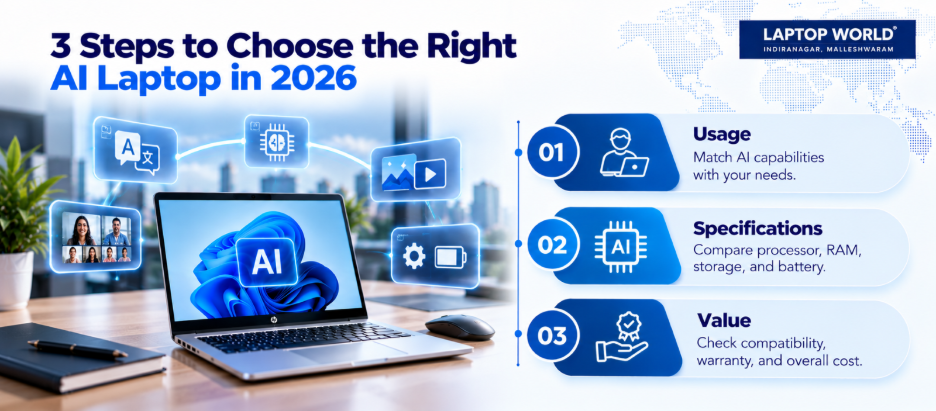
Use this checklist before making a purchase:
- Processor: Compare the exact processor model, not just the words “Core Ultra” or “Ryzen AI.”
- RAM: Consider 16GB as a practical starting point. Demanding local AI workloads may need more.
- Storage: A 512GB SSD is a useful starting point for work, applications, and files.
- Graphics: Check whether integrated graphics are sufficient for your creative or gaming requirements.
- Battery and portability: Compare weight, battery capacity, and runtime tests where available.
- Software compatibility: Check whether your applications support the processor architecture and AI features.
- Warranty: Review the manufacturer’s warranty, coverage, and service terms.
- Total cost: Include any paid software subscriptions you actually need.
Final Verdict: Should You Buy a Copilot+ PC in 2026?
Copilot+ PCs and AI laptops are worth considering, but the decision shouldn’t come down to marketing alone.
If your work involves on-device AI, frequent video calls, creative applications, or compatible productivity tools, the extra hardware capability may be valuable. If you mainly use spreadsheets, presentations, browsers, and video calls, a well-configured mainstream laptop may serve you just as well.
Explore your options at Laptop World and make your next purchase with confidence.
FAQs
1. What is the laptop price in Bangalore for AI laptops in 2026?
Prices vary by configuration. Indicative retail listings range from around ₹55,000 for some mainstream models to well over ₹1.5 lakh for premium or specialised machines. Check current listings for the exact configuration.
2. What is the difference between an AI PC and a Copilot+ PC?
AI PC is a broad category. Copilot+ PC is a Microsoft-defined category with specific hardware requirements, including an NPU exceeding 40 TOPS, at least 16GB RAM and at least 256GB storage.
3. Is a Copilot+ PC worth buying for students?
It can be useful for supported productivity, captioning and creative features. However, students who mainly use browsers, documents and learning platforms may get better value from a less expensive, well-configured laptop.
4. Do AI laptops need an internet connection?
Not for every AI task. Supported on-device features can work offline, while cloud-based AI services require an internet connection. Individual features have different requirements.
5. How much RAM should an AI laptop have?
Sixteen gigabytes is a sensible starting point for many everyday and productivity workloads. Advanced local AI models, professional creative work and development tasks may benefit from 32GB or more.