A Complete Guide to Laptop Cooling Pads – Do They Really Improve Performance?
Today, laptops are workhorses of productivity, gaming, content creation, and entertainment. However, with increasing demands on hardware, many users face common issues like overheating, fan noise, clock throttling, and reduced lifespan. But one accessory that frequently comes up in discussions is the laptop cooling pad. But do these devices really make a difference? In this comprehensive guide, we’ll explore…
Today, laptops are workhorses of productivity, gaming, content creation, and entertainment. However, with increasing demands on hardware, many users face common issues like overheating, fan noise, clock throttling, and reduced lifespan. But one accessory that frequently comes up in discussions is the laptop cooling pad. But do these devices really make a difference?
In this comprehensive guide, we’ll explore laptop cooling pad benefits, how they function, when they’re most effective, and what to look for when buying one.
What Is a Laptop Cooling Pad?
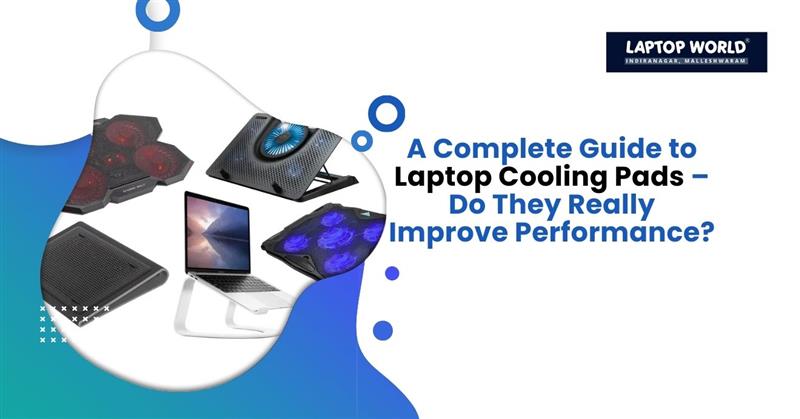
A laptop cooling pad is an external device that sits beneath your laptop to help reduce heat buildup. Typically powered via USB, these pads contain fans or a combination of fans and other cooling mechanisms that move air toward your laptop’s underside. Some models also feature raised platforms, adjustable angles, and ergonomic designs that complement cooling performance.
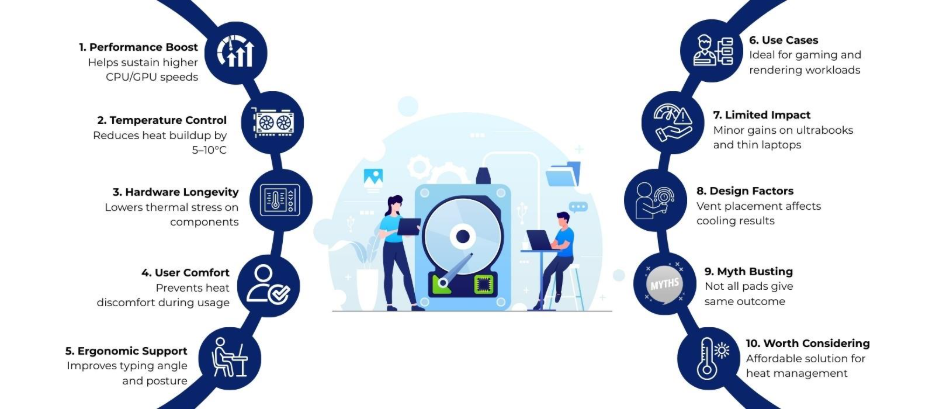
Top Laptop Cooling Pad Benefits
Let’s break down the key laptop cooling pad benefits and how they affect your usage experience:
1. Performance Enhancement
During demanding activities, laptops that struggle with heat management may experience CPU and GPU clock speed drops. This means your games will get choppy and your videos will take forever to render.
However, independent testing and user benchmarks indicate that effective cooling pads can lower surface or internal temperatures by approximately 3-10°C, depending on laptop design and airflow configuration. This temperature reduction can help systems maintain stable performance for longer periods, particularly during extended gaming or rendering sessions.
2. Temperature Reduction
Active cooling pads equipped with one or more fans can help lower internal or surface temperatures, particularly in laptops that draw air from bottom-mounted intake vents. In real-world testing, temperature drops typically fall within the 5-10°C range, depending on factors such as laptop design, airflow layout, workload intensity, and cooling pad quality. In controlled or highly favorable conditions, high-airflow cooling pads may deliver larger reductions, but such results are not consistent across all devices.
Passive pads, while less aggressive, still offer benefits by simply propping up the device. Even a basic elevation, like using a coaster, can improve airflow and cut temps by several degrees. For laptops used on soft surfaces like beds, where vents easily clog, pads provide a firm, ventilated base that keeps dust at bay.
3. Extended Hardware Longevity
By keeping temperatures in check, cooling pads help preserve hardware integrity. Lower thermal stress on the CPU, GPU, and battery reduces the risk of premature failure. Users note that consistent use leads to longer-lasting performance without degradation over time.
This benefit proves especially valuable for high-end gaming laptops, where components run hot under load.
4. User Comfort and Portability
Beyond technical gains, laptop cooling pad benefits include improved ergonomics. Placing a hot laptop directly on your lap can cause discomfort or even minor burns. A pad acts as a barrier, dispersing heat away from the user. Many designs also angle the laptop for better typing posture, which reduces strain on wrists and necks.
Do Laptop Cooling Pads Really Improve Performance?
The short answer: sometimes, but results vary.
When They Make a Noticeable Difference
- High-Performance Laptops: Gaming laptops and mobile workstations generate more heat due to powerful CPUs and GPUs. Cooling pads can help moderate temperatures during intense use.
- Under Heavy Load: Rendering video, 3D modeling, and long gaming sessions can push internal temperatures high. Extra airflow from a cooling pad may limit thermal throttling.
- Poor Internal Ventilation: Some laptop designs have limited cooling efficiency due to component layout or dust buildup. Supplementing airflow from the bottom can offer measurable improvements.
When the Benefits Are Limited
- Thin and Light Laptops: Ultrabooks and slim laptops often rely on side or rear vents rather than bottom intake. In such cases, a cooling pad may have minimal impact on core temperatures.
- Clean, Efficient Internal Cooling: Well-designed laptops with robust cooling systems may not show significant gains from a cooling pad under typical workloads.
Factors That Affect Cooling Pad Effectiveness
Several elements determine whether a cooling pad will help your setup:
- Laptop Design and Vent Placement
If your laptop draws air from the bottom, a cooling pad has a higher chance of lowering temperatures. Laptops with vents placed on the sides or rear may not benefit as much.
- Workload Type
Routine browsing and office work generate little heat. Cooling pads are most helpful under sustained heavy loads.
- Fan Speed and Quality
Cooling pads differ in fan size, RPM (revolutions per minute), and layout. Higher-quality pads with adjustable fan speeds can adapt to your needs.
- Surface and Positioning
Using a cooling pad on a hard, flat surface maximizes airflow. Soft surfaces like beds or cushions block airflow and reduce effectiveness.
Common Myths About Cooling Pads
Myth 1: Cooling Pads Keep Temperatures Constant
Cooling pads improve airflow, but they don’t lower temperatures. External cooling supports internal systems but can’t replace them.
Myth 2: All Cooling Pads Are the Same
There’s considerable variation in build quality, fan placement, and airflow performance. Reviews and specs matter.
Myth 3: They’re Only for Gamers
While gamers see the most benefit due to high thermal loads, professionals using demanding applications, and even everyday users seeking better comfort, can benefit.
Maintenance Tips for Cooling Performance
- Clean Regularly: Dust buildup inside your laptop and cooling pad reduces airflow over time. Use compressed air to clear vents and fan blades.
- Use on Proper Surfaces: Hard, flat surfaces optimize airflow from cooling pads.
- Monitor Temperatures: Software tools like HWMonitor or Core Temp help track CPU and GPU temperatures to see how well the cooling pad is working.
Are Laptop Cooling Pads Worth It?
Cooling pads are a cost-effective accessory that can deliver multiple benefits. However, their effectiveness depends on factors like laptop vent placement, workload, and pad quality. While they won’t revolutionize performance, they’re a sensible addition for many users looking to improve cooling and sustain peak performance over longer periods.
If you’re exploring laptop cooling pad benefits and planning to invest in a reliable cooling solution, you can visit Laptop World in Malleshwaram for expert guidance and a wide range of laptop accessories.
About Laptop World
With 20 years of experience in Retail, Laptop World is Bangalore’s oldest multi-brand laptop store, offering a personalized customer experience. We are unbiased towards any particular brand, dealing with top names like HP, Lenovo, Dell, Asus, and Apple. Our commitment to excellent customer service sets us apart.
For businesses, our corporate division, Nurture IT, provides comprehensive IT solutions tailored for startups, ensuring all your IT needs are met in one place. From laptops to networking, servers, Information Security, End User Protection – we have you covered.
FAQs
1. What are the main laptop cooling pad benefits?
Laptop cooling pad benefits include reduced operating temperatures, lower chances of thermal throttling, improved comfort during extended use, quieter fan operation, and potential support for longer hardware lifespan.
2. Do laptop cooling pads really improve performance?
Cooling pads can help improve sustained performance by reducing heat buildup that causes CPU or GPU throttling. Performance gains are usually modest and depend on laptop design and workload intensity.
3. How much temperature reduction can a cooling pad provide?
Most quality cooling pads reduce temperatures by around 3–10°C in real-world usage. Results vary based on airflow design, vent placement, and the cooling pad’s fan strength.
4. Are cooling pads effective for gaming laptops?
Yes, gaming laptops often benefit more because they generate higher heat during gameplay. Cooling pads can help maintain stable frame rates during long gaming sessions.