
Spilled Coffee on Your Keyboard? Immediate Steps to Take Before Bringing It to an Indiranagar Repair Shop
Nothing strikes fear quite like accidentally tipping a cup of coffee onto your laptop keyboard. Your first instinct may be to grab a cloth, keep working, or check whether the keys still respond. That instinct can make things worse. Coffee is not just water. Milk, sugar, oils, and other dissolved substances can leave residues inside…
Nothing strikes fear quite like accidentally tipping a cup of coffee onto your laptop keyboard. Your first instinct may be to grab a cloth, keep working, or check whether the keys still respond.
That instinct can make things worse.
Coffee is not just water. Milk, sugar, oils, and other dissolved substances can leave residues inside the laptop. If liquid reaches powered electronic components, it can create unwanted electrical paths and contribute to short circuits or corrosion. That is why what you do in the first few minutes matters.
Before searching for a laptop repair shop near Indiranagar, follow a controlled emergency procedure.
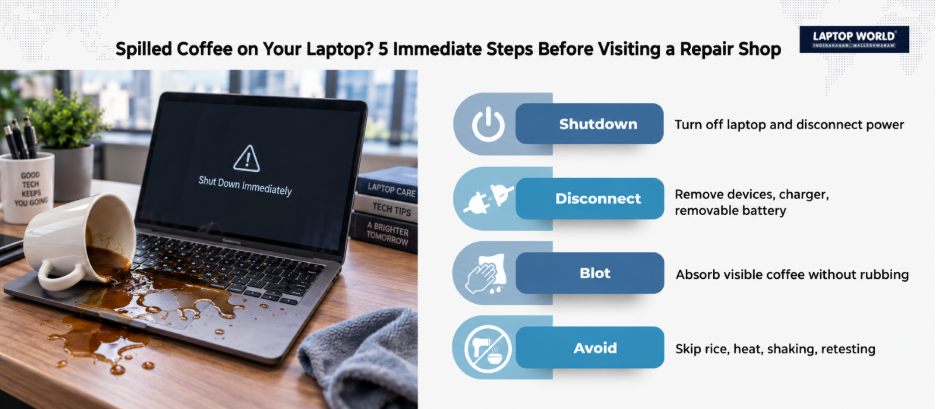
1. Stop Using the Laptop Immediately
The most important step is simple: cut the power.
Press and hold the physical power button until it switches off. Do not spend time saving files or closing applications normally. Lenovo advises users to unplug the AC adapter and turn the computer off immediately after a liquid spill because it can reduce the risk of short-circuit damage.
Once it is off, disconnect the charger from both the wall outlet and laptop.
Remove connected USB devices, HDMI cables, headphones, memory cards, and other peripherals.
If your laptop has a removable battery, remove it. However, a lot of modern laptops come with built-in batteries, so hold off on cracking the case open unless you’ve got the exact manufacturer guide and the right tools on hand.
2. Do Not Press the Power Button Again
This is one of the easiest mistakes to make.
The screen may have gone black, but you may be tempted to switch the laptop back on “just to see if it works.”
Don’t.
A laptop can appear normal immediately after a spill and develop problems later. Liquid and residue can remain beneath the keyboard or around internal circuitry. Experts say you should completely dry out a liquid-affected notebook and recommend professional inspection even when the computer appears to function normally, because oxidation and corrosion can cause later failures.
The safest approach is to leave testing to a professional after the machine has been properly inspected and cleaned.
3. Blot the Coffee, Don’t Scrub It Deeper
Use a clean, absorbent, lint-free cloth or paper towel to gently blot visible liquid.
Avoid aggressively rubbing the keyboard.
Why? Rubbing can spread liquid across a larger area and potentially push it between keys or openings. Your goal at this stage is not to clean the entire laptop. It is to remove accessible liquid without forcing more of it inside.
Pay particular attention to:
- The keyboard surface
- Trackpad
- Palm rest
- USB ports
- Charging port
- Vent openings
- Gaps around the chassis
Do not pour cleaning liquid onto the keyboard to “neutralize” the coffee.
4. Position the Laptop According to Its Design
There is no single universal orientation that is appropriate for every laptop.
Some laptops have dedicated keyboard drainage channels, while others have different internal layouts. Therefore, check the support documentation for your exact model before attempting to drain it.
If you are unsure about the design, don’t experiment with aggressive shaking, twisting, or repeated repositioning. Take it to a technician.
5. Forget the Rice and Hair Dryer Tricks
Two common internet remedies deserve to be retired.
Rice is not a laptop repair method. It does not remove internal moisture, and particles can enter openings or remain underneath keys.
A hair dryer is another bad idea.
High heat can affect plastics, adhesives, displays, and other components. ASUS specifically says not to use a hair dryer to dry a liquid-affected notebook because heat can deform the device.
Therefore, avoid placing the laptop under direct sunlight, beside a heater, or against another high-temperature source.
6. Coffee Type Matters
Not every spill creates the same cleaning challenge.
Plain water primarily introduces moisture. Coffee can introduce additional substances such as sugar, milk, and oils. Once liquid evaporates, those substances can remain behind as residue.
That matters because a laptop that “looks dry” may not actually be clean internally.
A few drops of black coffee that stayed on the keyboard surface are very different from a large latte that flowed through the keyboard into the chassis. Therefore, when you contact a laptop repair shop near Indiranagar, tell the technician exactly what was spilled and approximately how much entered the laptop.
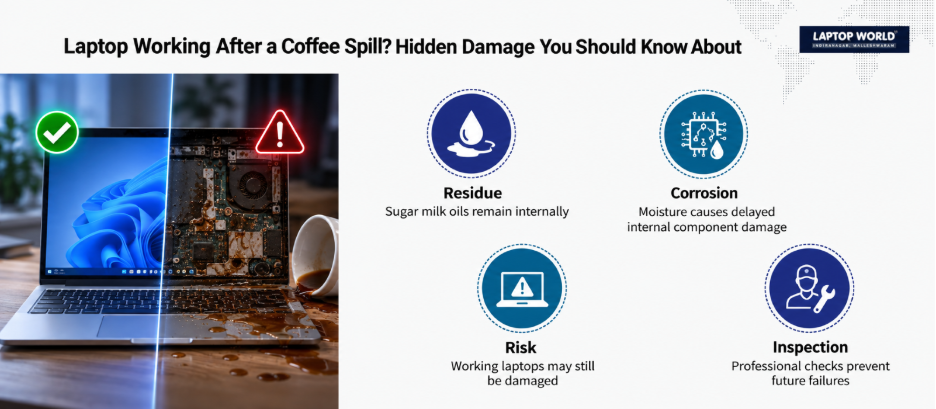
7. Don’t Assume a Working Laptop Is a Healthy Laptop
Suppose you spilled coffee, immediately shut the laptop off, wiped it, and later noticed everything looked normal.
That is good news, but it is not proof that there is no internal damage. Liquid can still reach areas that are not visible from the outside. Residue may also remain after the moisture itself has evaporated.
If your laptop does power on after a spill, back up important files immediately. ASUS similarly recommends backing up important files if a notebook successfully starts after drying.
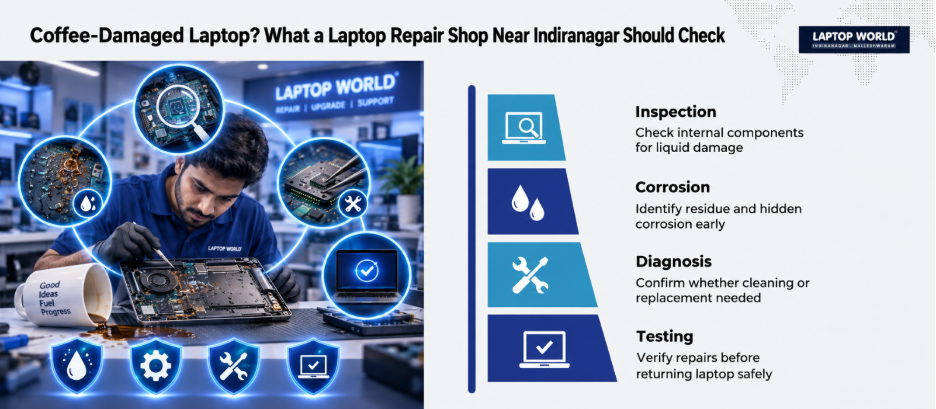
8. What Should a Technician Actually Check?
Depending on the laptop and spill severity, a technician may need to inspect:
- Keyboard and keyboard connector
- Motherboard and affected circuitry
- Battery and battery connector
- Charging circuitry
- Trackpad
- Storage device
- Display and display connector
- USB and other ports
- Signs of residue or corrosion
The keyboard itself may be damaged even when the motherboard survives. On the other hand, a laptop may have a functioning keyboard while liquid has reached deeper circuitry.
9. Don’t Agree to a Keyboard Replacement Too Quickly
A few dead keys do not automatically mean that replacing the keyboard is the only repair required.
After a coffee spill, the keyboard may be the most obvious symptom while the underlying problem is elsewhere.
Therefore, ask the technician:
- Was liquid found inside the chassis?
- Was there visible residue or corrosion?
- Was the motherboard inspected?
- Does the battery need testing?
- Is the keyboard the only affected component?
- Is cleaning possible, or is component replacement necessary?
- Will the repair include testing after reassembly?
This turns a vague “coffee damage” diagnosis into a more useful technical assessment.
10. What to Take to the Repair Shop
When transporting a liquid-damaged laptop, keep it protected from additional moisture and avoid turning it on during the journey. Take the charger separately if it may be needed for diagnostic testing.
Also tell the technician when the spill happened. For example:
“About 45 minutes ago, half a cup of milk coffee spilled over the keyboard while my laptop was running. I immediately forced it off, disconnected the charger, and wiped the surface.”
That is far more useful than simply saying, “My laptop isn’t working.”
The Bottom Line
A coffee spill is an emergency, not an ordinary keyboard problem. The biggest mistake is treating the laptop as “fine” simply because the screen comes back on. The right response is not to panic or start dismantling the machine. It is to stop electrical activity quickly and avoid actions that can spread the liquid or create additional damage.
If you need professional assistance afterward, visit the Laptop World store in Malleshwaram, and our team will be happy to help you out!
FAQs
1. Should I turn off my laptop immediately after spilling coffee?
Yes. Disconnect the charger and turn the laptop off immediately. Lenovo specifically recommends cutting power as quickly as possible after a liquid spill.
2. Should I use a hair dryer on a wet laptop?
No. ASUS specifically advises against using a hair dryer because heat can deform parts of the notebook.
3. Can I put my laptop in rice after spilling coffee?
No. Rice is not a reliable method for removing internal liquid and can introduce particles into the laptop.
4. What if the laptop still works after the coffee spill?
Don’t assume it is completely fine. Liquid or residue may remain inside. A professional inspection can identify problems that are not immediately visible.
5. Can only the keyboard be damaged?
Yes, but a spill can also affect connectors, the motherboard, battery circuitry, trackpad, ports, or other components. The extent depends on where the liquid traveled.