Signs Your Laptop Needs Replacement Instead of Repair
Learn the key signs your laptop needs replacement instead of repair. Expert tips from a laptop repair shop near Malleshwaram to save time and money.
Laptops are essential tools for work, study, and entertainment. But like any electronic device, they don’t last forever. Many users try to extend their laptop’s life through repairs, often visiting a laptop repair shop near Malleshwaram, hoping for a quick fix. While repairs can solve minor issues, there comes a point where replacing your laptop is the smarter and more cost-effective decision.
In this blog, we will help you identify the clear signs that your laptop has reached the end of its lifecycle and when investing in a new device makes more sense than continuing repairs.
Why It’s Important to Decide Between Repair and Replacement
Before diving into the signs, it’s important to understand why this decision matters. Frequent repairs can:
- Increase long-term costs
- Reduce productivity due to downtime
- Lead to data security risks
- Deliver diminishing performance improvements
A trusted laptop repair shop near Malleshwaram may help diagnose problems, but knowing when to stop repairing is key to saving time and money.
Key Signs Your Laptop Needs Replacement
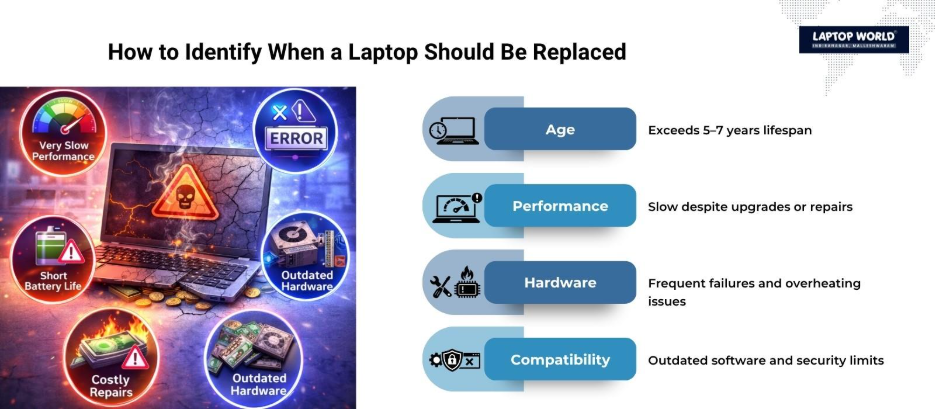
1. Your Laptop Is More Than 5-7 Years Old
Most laptops are designed to last between 5-7 years under normal usage. After this period:
- Hardware becomes outdated
- Software updates may no longer be supported
- Performance drops significantly
If your device is older than this and frequently needs attention from a laptop repair shop near Malleshwaram, replacement is usually the better option.
2. Repair Costs Are Too High
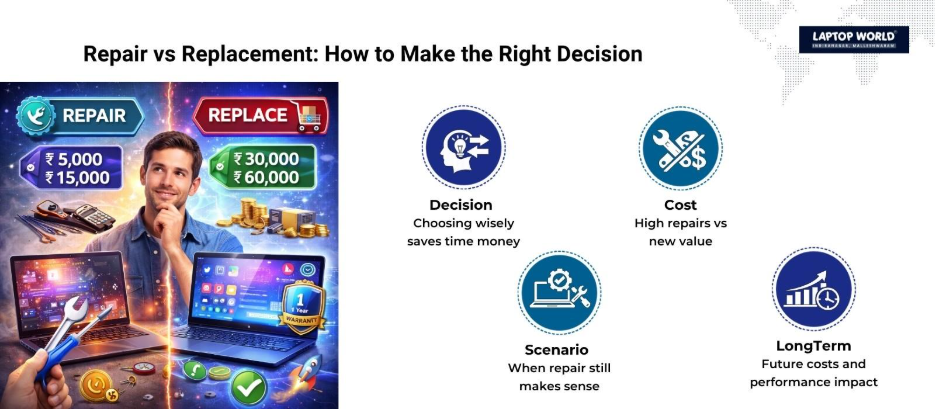
A good rule of thumb: if repair costs exceed 50% of the price of a new laptop, replacement is more practical.
Common expensive repairs include:
- Motherboard replacement
- Screen replacement for high-end displays
- Battery issues in sealed devices
Instead of repeatedly visiting a laptop repair shop near Malleshwaram, investing in a new system offers better value.
3. Slow Performance Even After Repairs
If your laptop remains slow despite:
- RAM upgrades
- SSD installation
- Software optimization
It indicates that the processor or motherboard is outdated. At this stage, no repair will significantly improve performance.
4. Frequent Hardware Failures
Recurring issues like:
- Keyboard not working
- Ports failing
- Overheating
- Random shutdowns
These point to deeper hardware degradation. Multiple visits to a laptop repair shop near Malleshwaram for different issues often signal that the system is nearing complete failure.
5. Battery Problems That Persist
Laptop batteries degrade over time, which is normal. However, if:
- Battery drains quickly, even after replacement
- Laptop shuts down unexpectedly
- Charging issues continue
It may indicate internal circuit problems rather than just a battery issue.
6. Overheating Issues
Overheating can damage internal components. While cleaning and thermal paste replacement can help, persistent overheating suggests:
- Aging CPU or GPU
- Poor internal airflow design
- Failing cooling system
Repeated overheating after servicing at a laptop repair shop near Malleshwaram is a strong sign to replace the device.
7. Incompatibility with Latest Software
Modern applications and operating systems require updated hardware. If your laptop:
- Cannot run the latest OS version
- Struggles with basic applications
- Experiences frequent crashes
It limits productivity and security. Replacement becomes necessary for smooth performance.
8. Storage Limitations
Older laptops often come with limited storage capacity and outdated HDDs. Even with upgrades:
- Expansion options may be limited
- Speeds may not match modern SSD standards
- Compatibility issues may arise
If storage upgrades don’t solve your needs, replacing the laptop is a better choice.
9. Display and Graphics Issues
Screen problems like:
- Flickering display
- Dead pixels
- GPU failures
These can be costly to fix. For older laptops, replacing the screen or graphics components may not be worth the investment.
10. Security Risks
Older laptops may not support:
- Latest security patches
- Firmware updates
- Modern encryption standards
This makes them vulnerable to cyber threats. Even a reliable laptop repair shop near Malleshwaram cannot fix outdated security architecture.
Repair vs Replacement: Quick Comparison Table
| Factor | Repair Recommended | Replacement Recommended |
| Laptop Age | Less than 4–5 years | More than 5–7 years |
| Repair Cost | Low (under 30% of new laptop cost) | High (above 50% of new laptop cost) |
| Performance | Minor issues | Consistently slow |
| Hardware Issues | Single component failure | Multiple recurring failures |
| Software Compatibility | Supports latest updates | Cannot run modern software |
| Battery Health | Easily replaceable | Persistent issues after replacement |
| Overheating | Occasional, fixable | Frequent, unresolved |
| Security | Updated and supported | Outdated and vulnerable |
When Repair Still Makes Sense
Not every issue requires replacement. Visiting a laptop repair shop near Malleshwaram is still a good option when:
- The laptop is relatively new
- Issues are minor (RAM, storage, battery)
- Repair costs are low
- Performance improves after upgrades
Repairs can extend the lifespan of a device if the core hardware is still strong.
Cost Consideration: Long-Term Perspective
Many users focus only on immediate repair costs. However, consider:
- Repeated repair expenses over time
- Productivity loss due to slow performance
- Increased electricity consumption in older devices
A new laptop may have a higher upfront cost but often delivers better value over 3-5 years.
Tips Before Making the Final Decision
Before deciding, follow these steps:
- Get a professional diagnosis from a laptop repair shop near Malleshwaram.
- Compare repair costs with new laptop prices
- Check compatibility with your work requirements
- Evaluate long-term usability
- Back up your data
Final Thoughts
If you’re constantly visiting a laptop repair shop near Malleshwaram and still facing recurring issues, it may be time to upgrade. That’s where Laptop World comes in.
Laptop World offers:
- A wide range of the latest laptops from top brands
- Expert guidance to help you choose the right device
- Affordable pricing with genuine products
- Professional diagnostics and honest recommendations
- Reliable after-sales support
Whether you’re upgrading from an old system or tired of repeated repairs, Laptop World helps you make a smart and cost-effective choice. Visit Laptop World today and experience technology that keeps up with your needs.
FAQs
1. How do I know if my laptop should be repaired or replaced?
If repair costs are high, performance is consistently slow, and your laptop is over 5–7 years old, replacement is usually the better option. A laptop repair shop near Malleshwaram can help assess the condition.
2. Is it worth repairing an old laptop?
Repairing an old laptop may not be cost-effective if multiple components are failing. In such cases, investing in a new device provides better long-term value.
3. What is the average lifespan of a laptop?
Most laptops last between 5 to 7 years, depending on usage, maintenance, and hardware quality.
4. Can upgrading RAM or SSD improve laptop performance?
Yes, upgrades like RAM and SSD can improve performance, but only if the processor and motherboard are still capable of handling modern tasks.
5. Can a laptop repair shop fix motherboard issues?
Yes, but motherboard repairs are often expensive. In many cases, replacing the laptop is more cost-effective than fixing the motherboard.