Laptop Keyboard Repair vs Replacement in Bangalore: Which One Do You Actually Need?
A laptop keyboard that starts missing keystrokes, repeating letters, or refusing to respond can disrupt your entire workday. But a faulty key does not automatically mean you need a new keyboard. Sometimes, cleaning, a software fix, or replacing a single key is enough. In other cases, replacing the complete keyboard is the more practical option. …
A laptop keyboard that starts missing keystrokes, repeating letters, or refusing to respond can disrupt your entire workday. But a faulty key does not automatically mean you need a new keyboard. Sometimes, cleaning, a software fix, or replacing a single key is enough. In other cases, replacing the complete keyboard is the more practical option.
If you’re considering laptop keyboard replacement in Bangalore, start by identifying what’s causing the problem. In this guide, we explain how to distinguish minor faults from hardware failure, what affects repair costs, and what to check before approving a repair.

1. When Is Laptop Keyboard Repair Enough?
Consider repair when the problem is limited to a specific component or doesn’t originate in the keyboard hardware itself.
Common situations include:
One loose or broken keycap: If the keycap or its retaining clip is damaged, it may be possible to replace that component individually. However, availability depends on the laptop model and the extent of the damage.
Dust or debris beneath keys: Accumulated dirt can interfere with key movement. Careful cleaning may help if the keyboard mechanism is otherwise intact.
Software-related issues: Incorrect keyboard settings, accessibility features, or driver problems can sometimes cause unexpected behaviour.
Loose keyboard connection: A disconnected or improperly seated ribbon cable can cause keyboard problems. Reconnecting it may resolve the issue if the cable and connector are undamaged.
There is a huge difference between a key that is jammed and one that feels fine but doesn’t actually register on screen. Since they point to different problems, figure out what is actually wrong before you start swapping out parts.
2. When Do You Need Laptop Keyboard Replacement?
Replacement becomes more likely when the keyboard itself has suffered widespread or irreversible damage.
Consider a replacement assessment if:
- Multiple keys have stopped responding without an obvious software cause.
- Keys repeatedly register characters even when pressed only once.
- Several keys remain stuck or behave unpredictably.
- Liquid has damaged the keyboard’s internal circuits.
- The keyboard membrane, conductive traces, or internal contacts are damaged.
- Repairing individual keys would cost nearly as much as replacing the keyboard assembly.
For some laptops, the keyboard is integrated into the palm rest or upper case. Replacing it can therefore involve more labour and additional components.
3. Repair vs Replacement: How Do You Decide?
You may use this comparison as a starting point:
| Problem | Likely solution |
| One detached keycap | Refit or replace the keycap if compatible |
| Dirt beneath a key | Careful cleaning, if appropriate |
| Keyboard disabled through settings | Software troubleshooting |
| Multiple dead keys | Keyboard and connection diagnosis; replacement may be needed |
| Random characters after a spill | Immediate power-off and internal inspection |
| Damaged keyboard membrane | Keyboard replacement is often necessary |
| Keyboard and motherboard damage | Assess both components before approving repairs |
The deciding factor is the actual fault, not simply how many keys have stopped working.

4. What Affects Laptop Keyboard Replacement Cost in Bangalore?
There isn’t one fixed price for every laptop keyboard. The final quote depends on the model, component availability, and complexity. Consider these factors:
- Laptop model: A common office laptop may use a more readily available keyboard than a premium ultrabook.
- Keyboard design: Some keyboards are replaceable as separate components, while others are built directly into the palm rest. As a result, you have to tear apart half the laptop to replace a few broken keys.
- Backlighting: A backlit keyboard needs compatible components and connections.
- Part quality: Ask whether the replacement is an original manufacturer part or a compatible alternative.
- Labour charges: The time needed to open the laptop, replace the component, and test it affects the total.
- Additional damage: Liquid exposure or a damaged connector can increase the repair scope.
Therefore, ask for an itemised quotation covering the part, labour, any additional repairs, and warranty terms.
5. What Should You Check Before Approving a Repair?
Before proceeding with laptop keyboard replacement in Bangalore, take these practical steps.
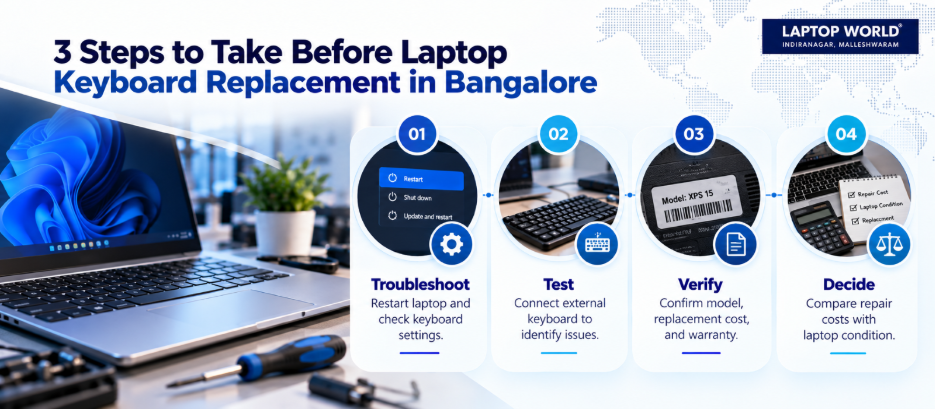
- Identify your exact model. Check the model number on the underside of the laptop or in its system information. The product family alone may not identify the correct keyboard.
- Describe the symptoms clearly. Tell the technician which keys fail, whether the issue is intermittent, and when it started.
- Mention any spill or physical damage. Even if the laptop still works, this information can change the diagnostic process.
- Request a written estimate. Confirm the part type, labour charges, expected turnaround, and warranty.
- Check every key after installation. Test letters, numbers, function keys, the spacebar, Enter, Shift, arrow keys, and the backlight if applicable.
Laptop World offers in-store repair and maintenance services.
6. Is DIY Keyboard Repair a Good Idea?
DIY troubleshooting is reasonable for simple software problems. You can restart the laptop, check keyboard settings, test an external USB keyboard, and determine whether the problem affects the built-in keyboard alone.
However, opening a laptop is a different matter. Modern designs may use delicate ribbon cables, fragile clips, adhesive-mounted components, or integrated keyboard assemblies. Incorrect disassembly can damage connectors or surrounding parts.
If the laptop is under warranty, check the manufacturer’s repair terms before opening it.
7. When Is It Better to Replace the Laptop Instead?
A faulty keyboard alone rarely justifies replacing an otherwise reliable laptop. However, consider the bigger picture if the device also has a failing battery, damaged screen, poor performance, or other expensive faults.
For a relatively new laptop with good performance, replacing the keyboard may be a sensible investment. If several major components are failing, buying another device could offer better long-term value.
FAQs
1. Can a laptop keyboard be repaired without replacing the whole unit?
Yes. A loose keycap, minor debris issue, software fault, or accessible connection problem may be repairable. Internal keyboard damage may require replacement.
2. How do I know if my laptop keyboard needs replacement?
Multiple unresponsive keys, repeated characters, or widespread failure can indicate hardware damage. A technician should confirm the cause before recommending replacement.
3. How much does laptop keyboard replacement in Bangalore cost?
The price depends on your laptop model, keyboard design, part availability, and labour. Request a model-specific quotation rather than relying on a generic estimate.
4. Can I replace just one laptop key?
Sometimes. If only the keycap or retaining mechanism is damaged, an individual replacement may work. Matching parts must be available, and the underlying mechanism must be intact.
5. Will a keyboard replacement delete my files?
Replacing the keyboard normally does not require deleting files from the storage drive. However, back up important data before service whenever possible.