How to Secure Your Laptop from Theft or Cyber Attacks in India
Today, laptops have become a part of daily life. However, from online banking to personal data, laptops hold sensitive information that can be valuable for cybercriminals or thieves. Therefore, protecting your laptop from theft or cyber attacks is necessary to avoid data loss, financial risks, and privacy breaches. In this blog, we will discuss effective laptop security…
Today, laptops have become a part of daily life. However, from online banking to personal data, laptops hold sensitive information that can be valuable for cybercriminals or thieves. Therefore, protecting your laptop from theft or cyber attacks is necessary to avoid data loss, financial risks, and privacy breaches. In this blog, we will discuss effective laptop security tips India users can apply to keep their devices and data safe.
Why Laptop Security Matters in India
India has seen a sharp rise in cybercrime over the past few years. According to the NCRB “Crime in India 2023” report, cybercrime cases rose sharply by about 31% in 2023 compared to 2022. It recorded 86,420 cybercrime cases in 2023, up from 65,893 in 2022.
Laptops, being portable and loaded with personal and professional data, are prime targets for cybercriminals and thieves. It can result in identity theft, financial fraud, and leakage of confidential information.
However, by following the practical laptop security tips India below, you can reduce the chances of theft or cyber attacks while using your device.
Physical Security: Protect Your Laptop from Theft
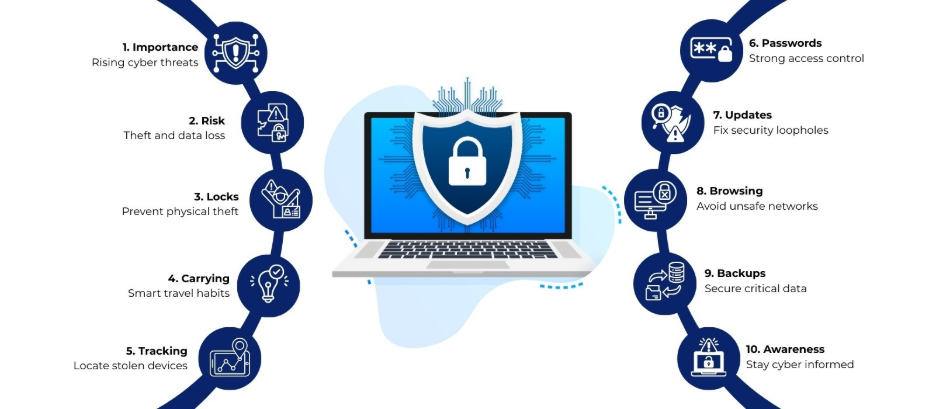
Physical theft is a major risk, especially in crowded public places, public transport, and other areas. Here are some steps to safeguard your laptop:
1. Use a Laptop Lock
A laptop lock physically secures your laptop to a desk or stationary object. Kensington locks or similar security cables are affordable and widely available in India. They act as a deterrent for opportunistic thieves, especially in offices, libraries, or cafes.
2. Carry Your Laptop Smartly
Always carry your laptop in a padded bag or backpack designed to conceal it. Avoid flashy laptop bags that attract attention. In crowded trains or buses, keep your bag close to your body and in front of you.
3. Avoid Leaving Laptops Unattended
Leaving laptops on tables in public spaces or unlocked offices increases the risk of theft. Therefore, make it a habit to keep your laptop with you or in a secure location at all times.
4. Install GPS Tracking Software
Some laptops, especially those running Windows or macOS, support device tracking software. Features like Find My Device (Windows) or Find My Mac (Apple) can help locate your laptop if stolen.
Digital Security: Protect Against Cyber Attacks
Cyber threats like malware, ransomware, phishing, and hacking are common in India. Here’s how to strengthen digital security on your laptop:
1. Use Strong Passwords
A strong, unique password protects your laptop and accounts from unauthorized access. Combine uppercase and lowercase letters, numbers, and special characters. Avoid easily guessable passwords like birthdays or simple sequences.
2. Enable Two-Factor Authentication
Two-factor authentication (2FA) adds an extra layer of security. Even if someone obtains your password, they cannot access your accounts without the second verification step, such as an OTP or authentication app.
3. Keep Your Operating System Updated
Regularly updating your laptop’s operating system and software patches protects against vulnerabilities. Cybercriminals often exploit outdated systems to install malware or ransomware.
4. Install Reliable Antivirus Software
A good antivirus program blocks malicious files, detects ransomware, and prevents unauthorized access. Popular options in India include Norton, Kaspersky, Bitdefender, and McAfee. Schedule regular scans to maintain safety.
5. Use a Firewall
A firewall monitors network traffic and prevents unauthorized access to your laptop. Both Windows and macOS have built-in firewall options. Activate it to add a protective barrier against cyber attacks.
Safe Browsing Practices
How you browse online plays a big role in protecting your laptop. Unsafe websites, phishing links, and unsecured Wi-Fi networks are common gateways for malware.
1. Avoid Public Wi-Fi for Sensitive Work
Public Wi-Fi in cafes, airports, or hotels can be unsecured and prone to hacking. If you must use public networks, use a VPN (Virtual Private Network) to encrypt your internet traffic.
2. Check Website Security
Before entering passwords or financial information, check if the website uses HTTPS. This adds encryption and makes it harder for cybercriminals to intercept data.
3. Avoid Clicking Suspicious Links
Emails, pop-ups, or social media messages with unknown links often carry malware. Never click on links from untrusted sources, even if they appear legitimate.
Data Protection: Backup and Encryption
Losing a laptop is stressful, but losing data can be catastrophic. Backing up and encrypting data adds layers of security.
1. Regular Backups
Store copies of important files on external hard drives or cloud storage like Google Drive, OneDrive, or Dropbox. Regular backups reduce data loss risks in case of theft or malware attacks.
2. Use Disk Encryption
Encryption protects your files even if someone steals your laptop. Tools like BitLocker (Windows) or FileVault (Mac) encode data so it cannot be accessed without a password.
Awareness and Training
Being cautious and informed is the first line of defense against theft and cyber attacks.
1. Recognize Phishing Attempts
Phishing is a common cyber threat where attackers impersonate trusted sources to steal information. Look for spelling errors, suspicious email addresses, or unexpected attachments.
2. Educate Yourself on Cyber Threats
Many cyber attacks happen because users are unaware. Attend online cybersecurity workshops, read updates from credible sources like CERT-In India, and stay informed about the latest threats.
Special Tips for Laptop Security in India
- Use Privacy Screens: In public places, privacy screens prevent shoulder surfing and protect sensitive information.
- Disable Auto-Connect: Turn off Wi-Fi and Bluetooth auto-connect features to prevent unauthorized connections.
- Log Out from Shared Devices: Always log out from accounts and remove saved passwords when using shared devices.
- Secure Your Laptop Bag: Carry your laptop in a lockable bag or one that cannot be easily cut open.
Final Thoughts
Laptop security is a combination of physical precautions, digital protection, and awareness. Following these laptop security tips India users can reduce the risk of theft and cyber attacks. From using strong passwords and antivirus software to tracking your laptop and practicing safe browsing, each step contributes to keeping your device and data safe. By investing time in security measures, you protect not just your laptop but your privacy, financial information, and peace of mind.
About Laptop World
With 20 years of experience in Retail, Laptop World is Bangalore’s oldest multi-brand laptop store, offering a personalized customer experience. We are unbiased towards any particular brand, dealing with top names like HP, Lenovo, Dell, Asus, and Apple. Our commitment to excellent customer service sets us apart.
For businesses, our corporate division, Nurture IT, provides comprehensive IT solutions tailored for startups in Indiranagar, ensuring all your IT needs are met in one place. From laptops to networking, servers, Information Security, End User Protection – we have you covered.
FAQs
1. Is antivirus enough to protect my laptop in India?
Antivirus is important but not enough on its own. Combine it with firewalls, regular updates, strong passwords, and cautious browsing for better protection.
2. Can a stolen laptop be tracked in India?
Yes, laptops with features like Find My Device (Windows) or Find My Mac (Apple) can be tracked if activated before theft.
3. Are public Wi-Fi networks safe for online banking?
No, public Wi-Fi is prone to hacking. Use a VPN or avoid sensitive transactions on unsecured networks.
4. How often should I back up my laptop data?
Ideally, back up data weekly or more often if you handle important work or personal files.
5. What are some affordable laptop locks available in India?
Kensington locks, Targus locks, and generic cable locks are widely available in Indian e-commerce platforms and local electronics stores.