How Laptop Displays Compare: LCD vs IPS vs OLED – What’s Best for You?
When shopping for a new laptop, one of the most important decisions is the type of screen you choose. The display is your window to work, entertainment, gaming, and creative projects. Therefore, a thoughtful laptop display comparison can help you understand how different technologies perform and which is most suitable for your needs. In this…
When shopping for a new laptop, one of the most important decisions is the type of screen you choose. The display is your window to work, entertainment, gaming, and creative projects. Therefore, a thoughtful laptop display comparison can help you understand how different technologies perform and which is most suitable for your needs. In this guide, we break down the differences between LCD, IPS, and OLED displays so you can make an informed choice.
What Is a Laptop Display?
A laptop display is the physical panel that shows text, images, videos, and graphics. Its performance affects color accuracy, brightness, viewing angles, refresh rate, and overall visual quality. In general, modern laptops use one of three primary display technologies:
- LCD (Liquid Crystal Display)
- IPS (In-Plane Switching, a subtype of LCD)
- OLED (Organic Light Emitting Diode)
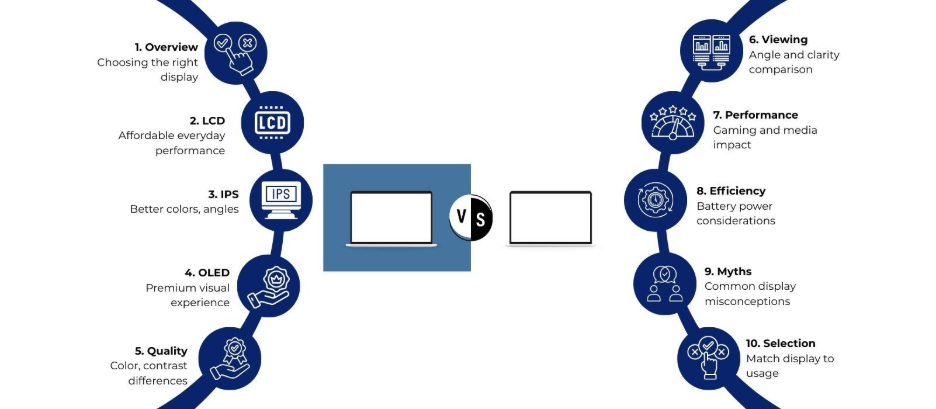
Each offers distinct benefits and limitations. The goal of this laptop display comparison is to help you decide which one fits your use case best.
Understanding LCD Displays
What Does LCD Mean?
LCD stands for Liquid Crystal Display. These screens use a backlight that shines through liquid crystal cells. By adjusting the crystals, the display controls how much light passes through to form images.
Strengths of LCD
- Cost-effective production → lower laptop prices
- Good performance for basic tasks (web browsing, documents)
- Consistent brightness across the screen
- Stable and reliable over time
Limitations of LCD
- Narrower viewing angles compared to IPS and OLED
- Limited contrast ratio (darker blacks appear gray)
- Color accuracy may not be strong without calibration
- Backlight can cause light bleed at the edges
When LCD Is a Good Choice
If you mainly use your laptop for everyday tasks, streaming video, and office work — and price matters — traditional LCD displays can be a practical choice.
What Makes IPS Displays Different?
What Is IPS?
IPS stands for In-Plane Switching. It is a specific type of LCD panel that improves on basic LCD technology by changing how liquid crystals align. This produces better colors and viewing angles.
Benefits of IPS
- Wider viewing angles than standard LCDs
- Strong color consistency and more accurate reproduction
- Good balance of affordability and quality
- Better suited for photo editing, design, and content creation
Drawbacks of IPS
- Slightly higher cost than basic LCD
- Contrast isn’t as deep as OLED
- May consume more power than non-IPS LCD variants
When IPS Shines
IPS is often the best display type for users who care about image quality without paying a premium. Students, professionals, photographers, and regular multimedia users can benefit from IPS displays.
Exploring OLED Displays
What Is OLED?
OLED stands for Organic Light Emitting Diode. Instead of using a backlight like LCD and IPS, each pixel in an OLED panel emits its own light. This difference creates major advantages in color and contrast.
Advantages of OLED
- True blacks — pixels turn off completely
- Exceptional contrast and deeper colors
- Fast response times ideal for gaming and video
- Wider color gamut for creative work
Challenges with OLED
- Higher cost than LCD and IPS
- Potential burn-in risk if static content is displayed for long durations
- May consume more power, especially with bright content
- Limited availability in some laptop models
Who Benefits Most from OLED
Content creators, serious gamers, and anyone who values cinematic visuals or high contrast will find OLED displays impressive. They are the premium option in laptops.
| Feature | Standard LCD | IPS | OLED |
| Backlight Type | Yes | Yes | No |
| Color Accuracy | Basic | Good | Excellent |
| Viewing Angles | Narrow | Wide | Very Wide |
| Black Levels | Grayish | Better | True Black |
| Contrast Ratio | Low | Medium | Very High |
| Response Time | Slow-Moderate | Moderate | Very Fast |
| Power Efficiency | Moderate | Moderate | Variable |
| Price | Most Affordable | Mid-Range | Premium |
| Gaming & Media | Okay | Good | Excellent |
| Professional Creative Work | Limited | Suitable | Outstanding |
This laptop display comparison highlights how each technology performs across key attributes. OLED clearly leads in color and contrast, while IPS balances quality and cost. Standard LCD is the most budget-friendly.
Display Resolution and Refresh Rate
Beyond panel technology, resolution and refresh rate heavily influence the viewing experience:
- Resolution determines how sharp your display looks (e.g., Full HD, QHD, 4K).
- Refresh rate affects motion smoothness (e.g., 60Hz, 120Hz, 165Hz+).
Combining high resolution with advanced panel types like IPS and OLED results in noticeable clarity and fluidity, especially in creative and gaming laptops.
Power Consumption Differences
Display type can influence battery life. Standard LCD and IPS draw power from a constant backlight. OLED panels are more efficient when showing darker content because individual pixels can switch off. However, very bright images can increase power use. Battery performance varies by laptop model and display settings, so general claims about battery life should be viewed in context.
Common Misconceptions in Laptop Display Comparison
“OLED Displays Burn In Quickly”
Burn-in risk exists with OLED, but most modern laptops use mitigation techniques like pixel shifting and screen savers that reduce long-term static image damage.
“IPS Is Just Marketing”
IPS is a real advancement over basic LCD with measurable benefits in viewing angles and color. It remains one of the most widely used panels in mid-range to high-end laptops.
“Higher Resolution Always Means Better Display”
While resolution increases sharpness, other factors like panel quality, color calibration, and brightness also shape perceived display quality. A balanced combination matters more than resolution alone.
Choosing the Right Display for You
Use this quick guide to match your needs with display tech:
- Budget-Friendly Basic Use: Standard LCD
- Balanced Everyday and Creative Work: IPS
- Premium Visuals & High Contrast: OLED
Also consider resolution, refresh rate, brightness levels (nits), and color accuracy standards (sRGB, Adobe RGB, DCI-P3).
Final Thoughts
A thoughtful laptop display comparison helps you see beyond marketing claims and choose a screen that aligns with your workflow. By understanding how these technologies operate and perform, you can select a laptop display that matches your priorities — whether that’s productivity, creativity, or entertainment. If you face any display-related concerns or need expert guidance while choosing the right laptop, visit the Laptop World store in Malleshwaram to get reliable advice and professional support.
FAQs
1. What is the main difference between LCD, IPS, and OLED laptop displays?
The key difference lies in how images are produced. LCD and IPS displays use a backlight, while OLED panels light up each pixel individually, resulting in better contrast and deeper blacks.
2. Is IPS better than standard LCD for everyday laptop use?
Yes, IPS displays offer wider viewing angles and more accurate colors than standard LCD panels, making them better suited for daily use, multimedia, and light creative work.
3. Are OLED laptop displays good for professional content creation?
OLED displays are well suited for professional tasks such as photo editing and video production due to their high contrast ratios and wide color gamut.
4. Do OLED laptop screens consume more battery power?
OLED screens can use less power when displaying darker content, but bright visuals may increase power usage compared to LCD or IPS panels. Battery performance varies by usage patterns.
5. Is burn-in a serious concern with OLED laptop displays?
Burn-in is possible but uncommon in modern OLED laptops, as most models include software features that reduce the risk of image retention during long-term use.